Workday - How do I onboard my customers with OAuth?
Last updated: November 3, 2026
Overview
This guide is intended for Agent Handler for Product teams.
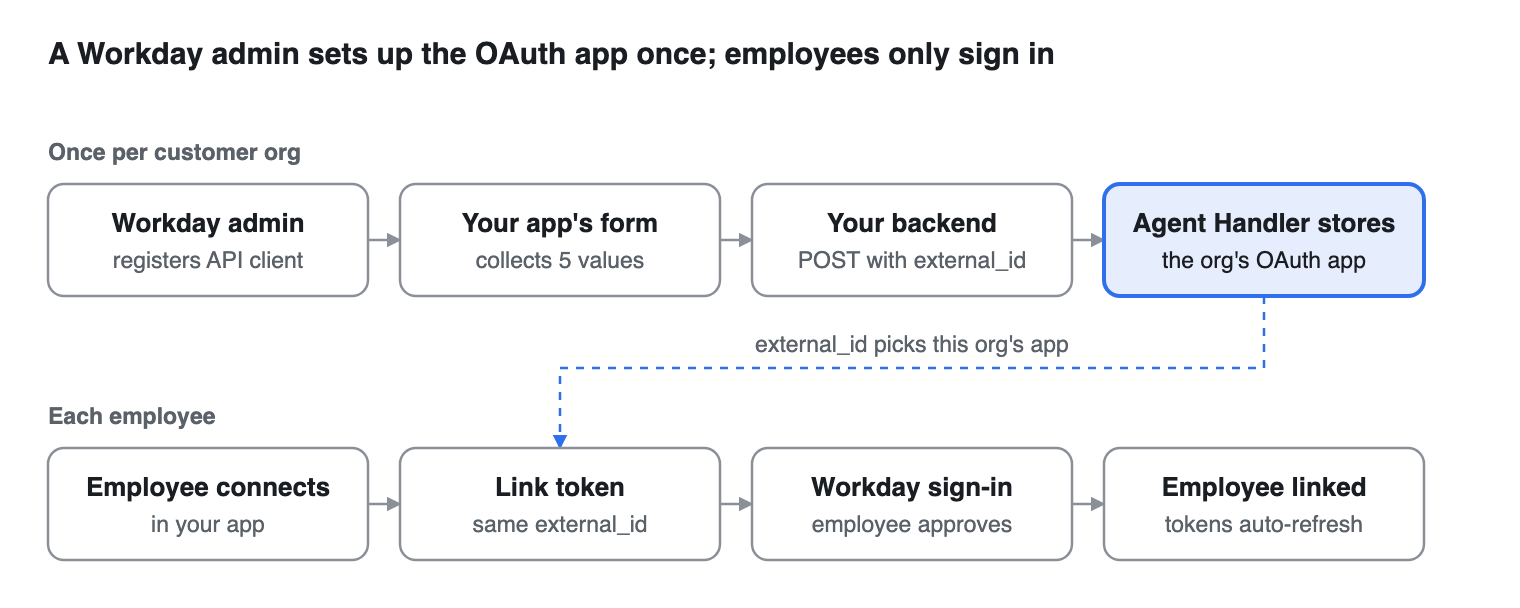
Each Workday tenant has its own OAuth credentials. Each of your customers' orgs must register a Workday API client before its employees can connect. A Workday admin does this once. After that, your customer's employees sign in with standard OAuth.
Agent Handler stores the Workday API client's details as an application credential. Your Agent Handler implementation must support creating Application Credentials via the API. The external_id your app sends in both flows ties an employee to their customer org's application credential.
In this guide, you will:
Get the API client details from your customer's Workday admin.
Post them to Agent Handler as an application credential.
Link each employee with the same
external_id.
Prerequisites
A Workday admin at the customer org who can create an API client in their tenant.
An Agent Handler API key.
Instructions
Step 1: Customer's Workday admin creates the API client
The admin follows How do I set up Workday API client credentials for my organization? in their own Workday tenant.
The admin gives you five values:
Client ID
Client secret
Tenant
Authorization base URL
REST API base URL
Step 2: Your app sends the API client details to Agent Handler
Your app shows the Workday admin a form for the five values from Step 1, then sends them to Agent Handler with one call. Only your customer's Workday admin sees this form. Employees never do.
Request: POST /api/v1/application-credentials/ (API reference) with your Agent Handler API key.
{
  "connector_slug": "workday",
  "external_id": "<your-customer-org-id>",
  "client_id": "<Workday client ID>",
  "client_secret": "<Workday client secret>",
  "secrets": {
    "tenant": "acme_dpt1",
    "authorize_base_url": "impl.wd12.myworkday.com",
    "base_url": "wd12-impl-services1.workday.com"
  }
}
Field | Notes |
|---|---|
| Your stable ID for the customer org, such as your internal org ID, not a display name; must be unique per org, with up to 128 letters, numbers, |
| From the Workday API client, with the secret encrypted by Agent Handler so you don't need to store it |
| The tenant and both base URLs, without |
The POST uses the connector's first OAuth option, the confidential OAuth 2.0 flow, which matches the client set up in Step 1.
The API treats external_id as optional, and you can omit it when one application credential covers the whole connector. Each customer org has its own Workday tenant and API client, so always send it here.
Each
external_idmust be unique. Posting one that already exists returns a 400.To rotate a secret or fix a URL,
PATCH /api/v1/application-credentials/<id>/(API reference).Find the id with
GET /api/v1/application-credentials/?external_id=<your-customer-org-id>(API reference).
Step 3: Employees connect with a standard OAuth sign-in
When an employee connects Workday, your app creates a link token that carries the same external_id, so Agent Handler uses that org's application credential.
Request: POST /api/v1/registered-users/<registered_user_id>/link-token/
{
  "connector": "workday",
  "external_id": "<your-customer-org-id>"
}
The employee then connects:
Your app opens the returned
magic_link_url, or the link token in Agent Handler Link.The employee signs in to their Workday tenant and approves access.
Workday redirects back to Agent Handler, which stores the employee's tokens and refreshes them with that org's application credential.
If no application credential exists for that external_id, the call returns a 400: No application credential found for connector 'workday' with external_id '...'.
Build your app so employees can't start linking until their Workday admin has set up the org's API client. Until then, show the employee a message to ask their Workday admin to finish setup.
Employees must have a login in the tenant where the API client was registered. Accounts from other Workday tenants can't use it.
Troubleshooting
Symptom | Likely cause | Fix |
|---|---|---|
Workday home page with | Workday rejected the request before redirecting: Redirection URI mismatch, wrong grant type, or client ID from another tenant | On View API Clients, confirm the Redirection URI is exactly |
Employee is asked for tenant or base URLs |
|
|
400 | No application credential posted for that org, or the | Use the identical |
400 | An application credential already exists for that |
|
Tool calls return 401 or empty results | Missing functional-area scopes on the client, or the employee's security groups lack access | Have the admin add scopes on the API client. Employees may need to reconnect |
To debug invalid_request:
Open DevTools and tick Preserve log on the Network tab.
Start the link again and copy the
.../<tenant>/authorize?...request URL.Compare its
client_idandredirect_uriwith the API client in Workday.